 The Tiny Cart
How CartKind Applies Your Ingredient Rules
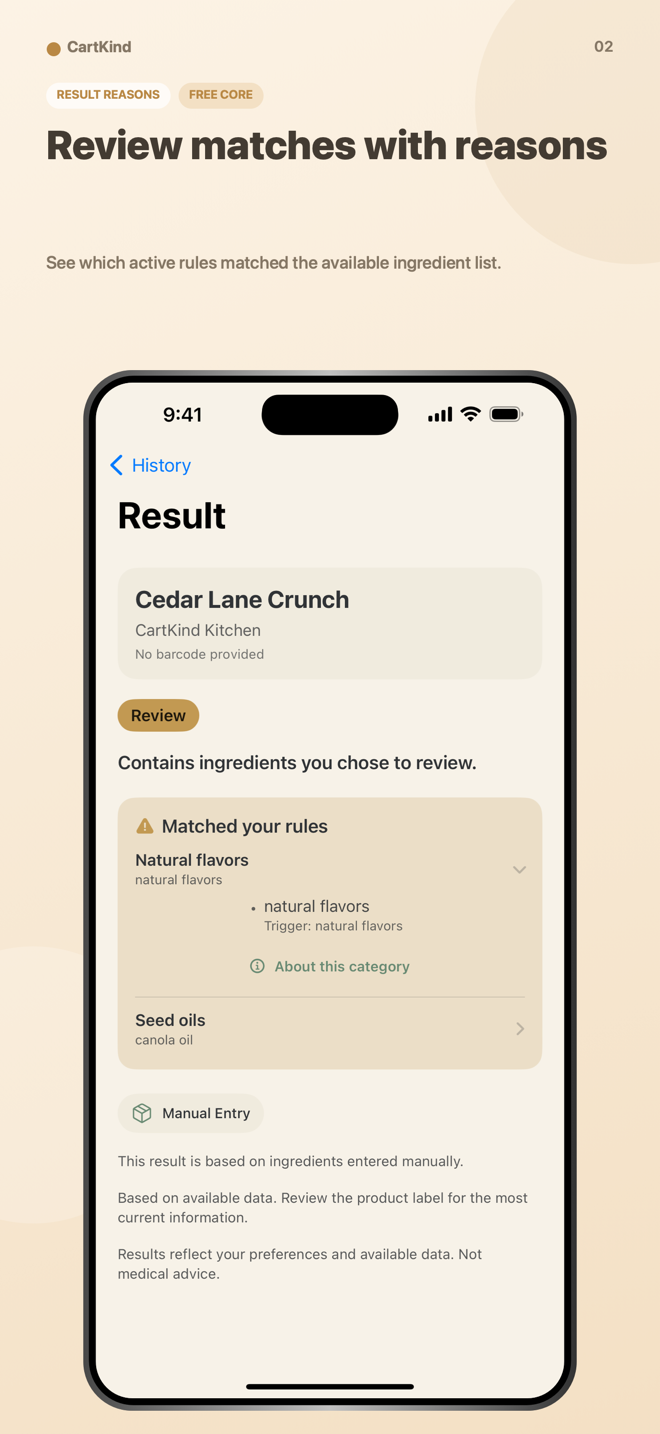
Ingredient lists can be long, product data can be inconsistent, and different households pay attention to different things. We built CartKind to make one narrow job easier: compare the ingredient text that is available with the rules you chose and keep the reasons visible.
Why CartKind Uses Your Rules Instead of a Universal Score
A single number or generic grade hides the assumptions behind it. CartKind takes a different approach: you decide how each supported category should respond, and the result shows the matches that led there.
The app uses four result states:
- Aligned: no active Warn me or Avoid rule matched the available ingredient text.
- Review: at least one active Warn me rule matched.
- Not aligned: at least one active Avoid rule matched.
- Unavailable: the app does not have enough ingredient information to evaluate.
Aligned is not a guarantee that a product is appropriate or safe. It only describes the comparison against the active rules and ingredient text available at that moment.
The CartKind Workflow
1) Scan a barcode—or enter information manually
Use the camera, type a barcode, or enter an ingredient list when a catalog result is unavailable. Camera access is optional because both manual paths remain available.
2) Look up available product data
Barcode lookup checks Open Food Facts first. Only when that catalog reports no match does CartKind send the barcode to a narrow Tyche Ventures relay that requests USDA FoodData Central results. The app shows the source used for a result when available.
Open Food Facts and USDA are third-party sources. Their names, ingredients, brands, categories, and images can be incomplete or inaccurate. CartKind does not maintain a complete independent product database.
3) Apply the actions you chose
Built-in rules can be set to Ignore, Warn me, or Avoid. Premium adds custom categories, ingredient triggers, and use of those custom rules in new evaluations.
4) Keep the explanation with the result
The result view keeps the available ingredient text, matched rules, explanation, and source together. Saved evaluations can be reopened from local History. Premium Insights summarizes patterns across the local records you keep.
What Is Included Free and With Premium
Free features include barcode scanning and manual entry, manual ingredient-list entry, built-in category controls, result explanations and source links, and saved local history.
Optional Premium adds custom categories, custom ingredient triggers, custom rules in new evaluations, and the Insights dashboard. Apple shows current monthly and yearly prices, renewal terms, and any introductory offer for which an Apple Account is eligible before purchase.
Privacy: Local Records, Specific Network Requests
No CartKind account is required. Rules, settings, and saved evaluations stay in the app on your device. Apple-managed backups can include local app data depending on device settings.
A barcode lookup necessarily sends the barcode and ordinary network metadata to the lookup service. Open Food Facts may retain IP and request logs under its privacy policy. After a catalog miss, the Tyche Ventures relay processes the barcode and ordinary request metadata and may retain limited operational or security logs for up to seven days. Apple processes subscriptions through StoreKit.
For the complete service, retention, and licensing details, read the CartKind Privacy Policy.
Data Sources and Licensing
Open Food Facts database content is available under the Open Database License (ODbL), individual database contents under the Database Contents License (DbCL), and product images under the license identified by Open Food Facts. USDA FoodData Central data is provided as U.S. government public-domain material under its published terms. Source links remain available from CartKind where applicable.
Examples of What CartKind Can—and Cannot—Do
- Can: show that an available ingredient string matched a rule you set to Warn me.
- Can: preserve the result and source that were recorded at the time of evaluation.
- Can: let you enter ingredient text manually when catalog data is missing.
- Cannot: confirm that a catalog entry matches the package in your hand.
- Cannot: identify undeclared ingredients, cross-contact, formulation changes, or every possible synonym.
- Cannot: decide whether a food is medically appropriate or safe for any person.
Download CartKind
CartKind is available on the App Store for iPhone and iPad.
View CartKind on the App Store →
See the current screenshots, upbeat app preview, plan details, and full safety boundary on the CartKind product page.