 The Tiny Cart
We Built a Visual Routine App for Kids — Here's How It Works
If you've ever said "brush your teeth" four times before 7:30 AM, watched your child melt down because bedtime "came out of nowhere," or wondered how other families make mornings look so effortless — we built this app for you.
Little Routines is a visual schedule app for kids that turns daily routines into something children can actually follow on their own. Morning, bedtime, after-school, weekend — whatever your family needs structure around.
This is our second app (after Kids Meal Planner), and it came from the same place: a real problem we kept running into as parents.
The Problem: Routines Live in Parents' Heads
Predictable routines can make the sequence of a busy morning or bedtime easier to see for some children. But the actual routine often lives in one parent's head as a mental checklist that gets repeated out loud, over and over, every single day.
- "Did you brush your teeth?"
- "Put your shoes on."
- "Is your backpack ready?"
- "We need to leave in five minutes."
That's not a routine — it's a parent narrating a routine while the child waits to be told each next step. It works when they're two. By four or five, it creates friction. By seven, it's a daily power struggle.
What kids actually need is a visual schedule they can check themselves. Something that shows them what's next, gives them ownership over completing tasks, and rewards them for following through without being nagged.
That's exactly what Little Routines does.
What We Built
Little Routines is a visual routine planner for kids with two modes: a parent setup mode and a kid-friendly mode with big buttons, star rewards, and celebration sounds.
Parents build the routine. Kids complete it. That's the whole idea.
1) Kid Mode — Designed for Little Hands
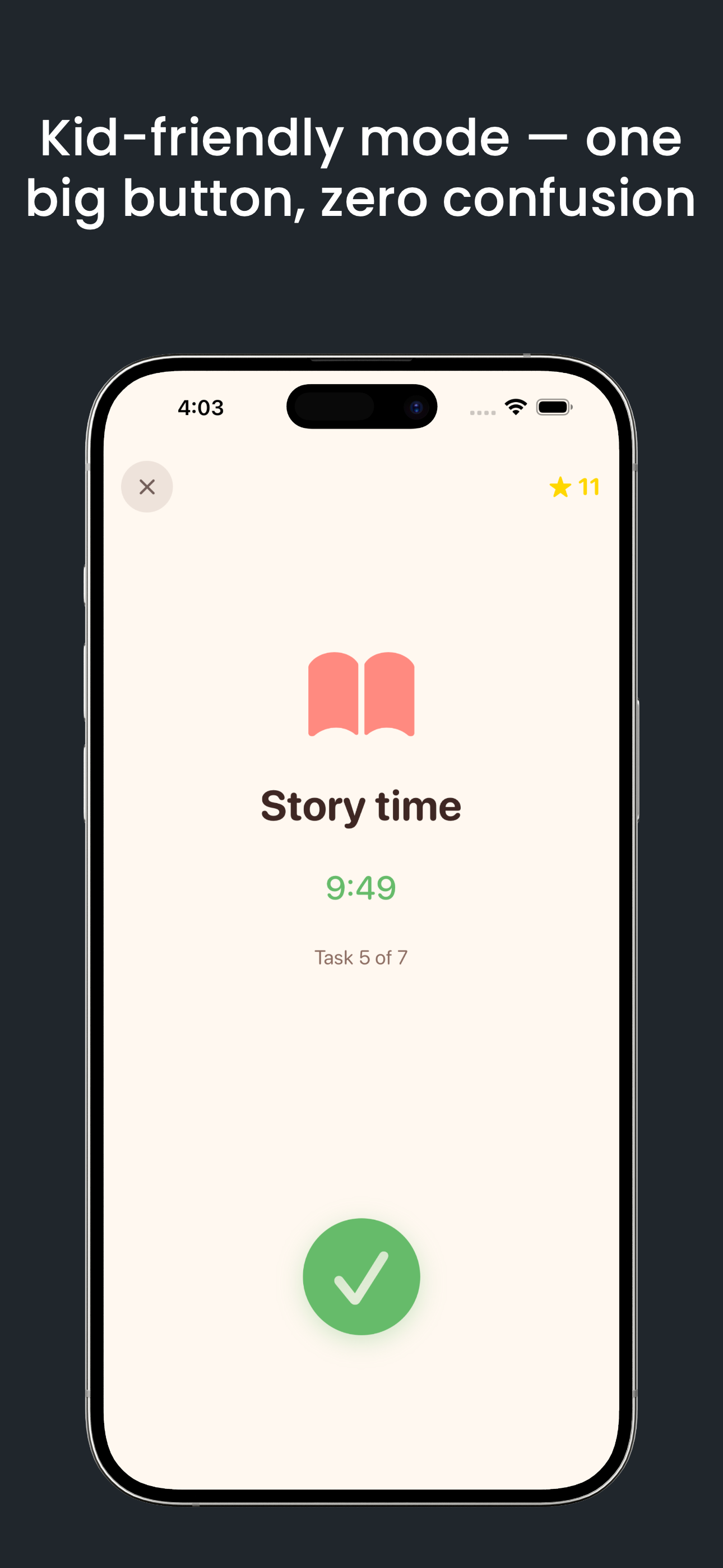
This is the heart of the app. Large, colorful task cards that kids can tap to mark complete. Each finished task earns a star. Complete the whole routine and they get a celebration animation.
The interface is deliberately simple — no tiny buttons, no text-heavy screens, no settings a curious toddler can accidentally change. Just their tasks, their progress, and their stars.
Example: Your five-year-old wakes up and opens the app on an iPad propped up in the bathroom. They see: wake up ✓, go potty, brush teeth, get dressed, eat breakfast, put on shoes. They tap each one as they go. No parent standing over them reciting the list.
2) Smart Routine Templates
Not sure where to start? Choose from 34 pre-built routine templates organized by age group and time of day:
- Toddler (0–4): Simple 3–5 step routines with basic tasks
- Kids (5–7): More independence, hygiene focus, school prep
- Pre-teen (8–12): Homework, chores, self-care, more responsibility
Templates cover morning, bedtime, after-school, weekend, potty training, calm-down, and more. Pick one, customize the tasks, and you're running in minutes.
Example: You pick the "Kids Morning Routine" template for your 6-year-old. It comes with wake up, make bed, brush teeth, get dressed, eat breakfast, pack backpack, put on shoes. You swap "make bed" for "feed the cat" because that's your family's reality. Done.
3) Built-In Task Timers
Some tasks need a time limit. Brushing teeth should take two minutes, not thirty seconds. Getting dressed shouldn't take twenty minutes of daydreaming.
You can attach optional timers to any task. The app counts down visually so kids can see how much time they have — building time awareness without a parent hovering with a stopwatch.
4) Star Rewards That Actually Motivate
Every completed task earns a star. Stars accumulate. Kids can see their progress over time. It is a simple feedback loop: finish a task, see the progress, and celebrate completion.
This isn't a complex gamification system with levels and badges and virtual currencies. It's straightforward: do the thing, get the star, feel good about it. That's enough for most kids.
5) Multiple Children, Multiple Routines
If you have more than one child, each can have their own profile with their own routines. Your toddler's bedtime routine is different from your second-grader's. The app keeps them separate and age-appropriate.
Free tier: 2 children, 2 routines each, 6 templates.
Premium: Unlimited children, unlimited routines, all 34 templates.
6) Progress Tracking for Parents
Parents can see which routines are getting completed, which tasks get skipped most often, and how consistency trends over time. This isn't surveillance — it's information that helps you adjust routines that aren't working.
If your child skips "make bed" every single morning, maybe the routine needs reordering, or maybe that task isn't realistic for their age yet. The data helps you make smarter adjustments instead of guessing.
Why Families Use Visual Schedules
A visual schedule can make the order of a routine easier to understand and may support predictability for some children. Little Routines is an organizational tool, not a clinical, developmental, or therapeutic service. Families may find the format useful for:
- Younger children who cannot read yet but can follow pictures
- Children who prefer predictable sequences and a visible “what comes next” reference
- Families introducing a new routine for school, bedtime, or another household transition
- Any household that wants to rely less on repeated verbal reminders
The core principle is simple: when kids can see what is expected, the routine may feel more predictable. They have a visible reference instead of waiting for every next instruction. Each child and family will respond differently, so the schedule should be adjusted to fit the household rather than treated as a guaranteed outcome.
How Little Routines Compares to Paper Charts
Plenty of parents start with magnetic charts or printed checklists on the fridge. Those work — until they don't. Common failure points:
- Charts get ignored after the novelty wears off (no sounds, no rewards loop)
- Magnets fall off and get lost
- Paper charts can't track progress over time
- You can't easily adjust tasks as your child grows
- Multiple children means multiple charts competing for fridge space
An app won't replace every physical tool, but it adds consistency, portability, and the kind of instant feedback that keeps kids engaged longer. Plus, you can update routines in seconds — try that with a laminated chart.
That said, if your family loves their physical chart, consider pairing it with the app: use Little Routines for tracking and progress, keep the fridge chart for the visual reminder.
Real Routines for Real Families
Here's how a few common scenarios play out with the app:
The chaotic morning family: Two kids, different schools, different start times. Each child has their own morning routine in the app. The older one checks tasks independently on the family iPad. The younger one works through it with a parent nearby but is learning to do it solo. Nobody's screaming "put your shoes on" at 7:45.
The bedtime negotiator: Your child argues about every step of bedtime. With a visual routine, the negotiation shifts from "you versus me" to "you versus the list." The routine is the authority, not the parent. That small reframe reduces conflict more than you'd expect.
The multi-caregiver household: On the same household device, a parent, grandparent, or nanny can follow the same saved routine. Little Routines does not sync routines between separate devices, so caregivers using different devices still need a direct handoff.
What's Free and What's Premium
Little Routines uses a freemium model. The free tier is genuinely usable — not a locked-down demo.
- Free: 2 children, 2 routines per child, 6 starter templates, Kid Mode, star rewards, basic progress
- Premium: Unlimited child profiles and routines, plus all 34 templates and starter packs
Apple shows any introductory offer for which your Apple Account is eligible, along with the current price and renewal terms, before purchase. Offer eligibility is determined by StoreKit and can vary by account and storefront.
Built by Parents, for Parents
Little Routines is our second family app, right after Kids Meal Planner. No Tyche account is required, and the app contains no third-party advertising or behavioral-analytics SDK. Routine data is local-first; Apple processes purchases through StoreKit, and Apple-managed device backups may include local app data depending on device settings.
We're not a big studio. We're parents who build tools we actually use with our own kids. That means features get tested at breakfast tables and during actual bedtime chaos before they ship.
Pair It With the Right Gear
A good routine app helps with structure. The right physical tools help with execution. Here are a few things that complement daily routines:
- Visual timers for kids — great for tasks where time awareness matters (getting dressed, homework blocks)
- Magnetic reward charts — complement the app with a physical chart on the fridge for younger kids who respond to tactile interaction
- Bathroom step stools — independence starts with being able to reach the sink
- Backpack organizers — helps with the "pack your backpack" step of morning routines
Download Little Routines
The app is live now on the App Store.
Download Little Routines on the App Store →
And if you're also looking for help with meal planning, check out our first app: Kids Meal Planner — plan weekly meals, track pantry items, and share schedules with caregivers.
Two apps. Two fewer things to keep in your head. That's the goal.